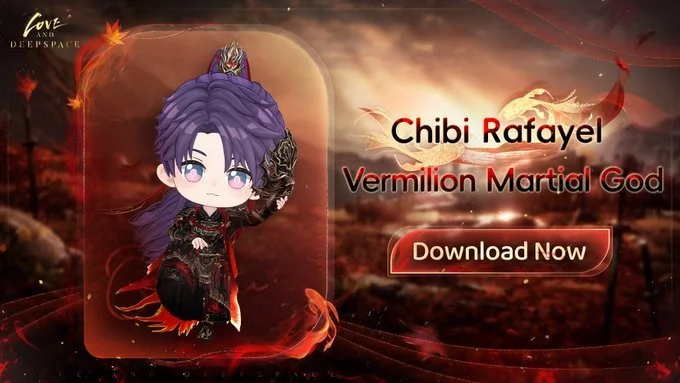
Love and Deepspace Releases Rafayel: Vermilion Martial God Chibi MMD Model
Love and Deepspace has released the official Chibi Rafayel: Vermilion Martial God MMD model for fans who want to create custom 3D animations and artwork. The downloadable model is available through the game’s official website under the Gallery section. Players and creators can access the file on the MMD Models page and use it in accordance with Infold Games’ copyright and usage guidelines.
The release follows the Vermilion Martial God theme associated with Rafayel’s latest character content. It gives fans another way to bring his themed appearance into their creative projects. The official announcement also highlights a special facial accessory that appears by default in the downloaded model.
Quick Summary: Rafayel’s Vermilion Martial God MMD Model
The new MMD download provides a chibi version of Rafayel inspired by his Vermilion Martial God appearance. Fans can download it directly from the official Love and Deepspace website, so they don't need to search unofficial model repositories.
| Detail | Officially Announced Information |
|---|---|
| Game | Love and Deepspace |
| Character | Rafayel |
| MMD Model Name | Chibi Rafayel: Vermilion Martial God |
| Model Format | MMD model |
| Availability | Official Love and Deepspace website |
| Download Location | Gallery → MMD Models → Download Now |
| Default Facial Accessory | Burning Instant |
| Copyright Owner | Infold Games |
| Usage Requirements | Follow the official MMD Model Notice |
| Announcement Source | Official Love and Deepspace X account |
The announcement does not specify a game version, a separate release date for the model, or any in-game rewards for downloading it. The model should therefore be treated as an official creative asset rather than a new playable character, Memory, or event reward.
How to Download the Chibi Rafayel: Vermilion Martial God Model
Fans can find the model through the Gallery on the official Love and Deepspace website. To download, go to the MMD section, choose Rafayel’s model, and save the available file.
Step-by-Step Download Instructions
Open the official website. Visit Love and Deepspace.
Navigate to Gallery. Find the Gallery section.
Open MMD Models. Select the MMD Models category to browse the available character models.
Select Download Now. Locate the Chibi Rafayel: Vermilion Martial God model and choose the download option.
Save the model file. Follow the website’s instructions to complete the download.
Review the usage notice. Read the MMD Model Notice before using the file in animations, renders, or other creative projects.
The official announcement directs fans to the website’s MMD section rather than providing a separate model-file link. If the layout changes, the Gallery remains the stated starting point for finding the download.
What Makes the Vermilion Martial God Chibi Model Different?
The model brings Rafayel’s Vermilion Martial God theme into a chibi-style 3D format designed for MMD-based creative work. Its compact character design offers fans another way to represent the character outside the game’s usual presentation.
The announcement introduces the model with the line, “When autumn wind stirs… When we meet again.” This seasonal wording connects the release to the dramatic, traditional aesthetic of Rafayel’s Vermilion Martial God theme.
Unlike an in-game outfit unlock, the MMD model is a downloadable creative asset. Fans can use it in compatible MMD workflows, subject to Infold Games' restrictions. The announcement does not confirm any additional character abilities, gameplay features, or new story content tied to the file.
The Burning Instant Facial Accessory
Burning Instant is enabled by default in the downloaded model, but users can manually turn it off to reveal Rafayel’s face. This is the most important model-specific detail in the official announcement.
The default accessory affects how the character appears when creators first open or render the model. Anyone who wants to display Rafayel without the accessory should check the model’s available controls and turn it off manually.
| Model Feature | What Creators Need to Know |
|---|---|
| Facial Accessory | Burning Instant |
| Default Setting | Displayed when the model file is opened |
| Optional Adjustment | Can be manually switched off |
| Result After Disabling | Rafayel's face becomes visible |
| Confirmed Customization | The official announcement specifically identifies this facial adjustment |
| Other Customization Options | Not detailed in the announcement |
The notice confirms this adjustment, but it doesn't list all the model’s controls. Creators should review the downloaded file and its accompanying documentation before assuming they can change other accessories or design elements.
Official Model vs. In-Game Rafayel Content
The Chibi Rafayel: Vermilion Martial God MMD model is intended for fan-created content, not as a confirmed in-game unlock. Keeping these categories separate helps players understand what the announcement actually offers.
| Feature | Chibi Rafayel MMD Model | In-Game Character Content |
|---|---|---|
| Primary Purpose | Creating 3D animations and artwork | Playing Love and Deepspace |
| Access Method | Download from the official website | Obtain through the relevant in-game system |
| Usage Environment | Compatible MMD creative workflow | Love and Deepspace |
| Facial Accessory Detail | Burning Instant appears by default | Depends on the relevant in-game content |
| Gameplay Benefits | None announced | Depend on the specific item or character feature |
| Copyright and Usage | Governed by Infold Games' MMD Model Notice | Governed by the game's applicable terms |
This distinction matters for fans following Rafayel’s character releases. According to the announcement, downloading the MMD model does not grant a Memory, Companion, outfit, Diamonds, or other in-game rewards.
Copyright Rules and Responsible Use
Infold Games retains copyright ownership of the MMD model, and creators must follow the instructions in its official MMD Model Notice. Downloading the file does not mean it is free of usage restrictions or that you may redistribute it in any form.
Before publishing work made with the model, creators should review the accompanying notice for the rules that apply to their intended use. This is especially important for people planning to share animations, edited renders, or other derivative creative work publicly.
The announcement does not reproduce the complete usage policy. Therefore, don't assume specific permissions for commercial projects, redistribution, modifications, or attribution without checking the official notice.
For fans who follow official character merchandise and creative releases, it's also helpful to distinguish between downloadable digital assets and physical products. Animon Life follows developments across the official merchandise space, while this release is a digital MMD asset available through the game’s website. The announcement does not mean the model is available as a physical product or through third-party retailers.
Where to Find the Official Announcement
The official Love and Deepspace X post is the primary source for the model’s name, download instructions, and details on the Burning Instant accessory. Readers can also check the game’s website for the latest information.
Official announcement: Love and Deepspace on X
Official website: Love and Deepspace
Official Discord: Join the Love and Deepspace Discord
Game download and login: Love and Deepspace
The official website is the recommended place to start to obtain the model. Creators should also check the MMD Model Notice for the complete usage requirements.
Final Thoughts
Chibi Rafayel: Vermilion Martial God gives Love and Deepspace fans an official 3D asset for creating character-focused animations and artwork. The model is available in the website’s Gallery, and users can manually turn off its default Burning Instant facial accessory. Before sharing creations, users should review Infold Games’ usage rules to ensure their projects comply with the applicable restrictions.
Frequently Asked Questions
1. Is the Chibi Rafayel: Vermilion Martial God MMD model free to download?
The official announcement provides a download route through the Love and Deepspace website but does not explicitly state a price. Check the MMD Models page for the current download terms.
2. How do I download Rafayel’s Vermilion Martial God chibi model?
Visit the official website, open Gallery → MMD Models → Download Now, and select the Chibi Rafayel: Vermilion Martial God model. Follow the website’s instructions to save the file.
3. How can I remove the Burning Instant facial accessory?
Burning Instant appears by default in the downloaded model. The official announcement confirms that users can manually turn it off to reveal Rafayel’s face. Consult the model file and accompanying documentation for the relevant control.
4. Can I use the Rafayel MMD model in commercial projects?
The announcement does not confirm blanket permission for commercial use. Infold Games owns the model’s copyright, so creators should read the official MMD Model Notice before using it commercially, redistributing it, or publishing derivative work.
Animon Life continues to follow official merchandise releases and related developments for North American customers, including updates that help fans distinguish physical merchandise from digital creative assets.