Ridu Renovation Talk Vol. 11: Zenless Zone Zero Version 3.0 Upgrades the PC Visual Experience
Zenless Zone Zero Version 3.0 significantly improves the PC visual experience by introducing global illumination, ray tracing, enhanced scene rendering, and new graphics technologies for compatible hardware. Announced through Ridu Renovation Talk Vol. 11, these enhancements are designed to make New Eridu look more realistic while preserving the game's signature artistic style. The update focuses exclusively on the PC client, delivering higher-quality lighting, shadows, and reflections, along with smoother gameplay through modern graphics technologies.
Whether you're exploring city streets or engaging in combat, Version 3.0 aims to deliver a more immersive visual experience without changing the core gameplay. The developer preview also outlines hardware compatibility, graphics settings, and additional technologies that will continue expanding in future updates.
Zenless Zone Zero Version 3.0 PC Visual Upgrade Overview
Version 3.0 introduces multiple graphics improvements that work together to create richer environments and smoother performance. Instead of upgrading only one visual feature, HoYoverse has enhanced lighting, reflections, object rendering, and image upscaling to improve nearly every scene across New Eridu.
| Feature | Version 3.0 Improvement |
|---|---|
| Global Illumination | Enhanced ambient, indirect, and volumetric lighting. |
| Ray Tracing | Realistic lighting and shadow simulation on supported GPUs. |
| Model Detail Optimization | Smoother transitions between near and distant objects. |
| Reflection Upgrade | Improved reflections on glass, water, and metal surfaces. |
| Super Resolution | Support for NVIDIA DLSS and AMD FSR3 technologies. |
| Frame Generation | Support for DLSS Frame Generation and FSR Frame Generation for smoother gameplay. |
Rather than changing the game's artistic direction, these upgrades improve how lighting interacts with environments while maintaining Zenless Zone Zero's distinctive visual style.
Global Illumination Creates More Natural Lighting
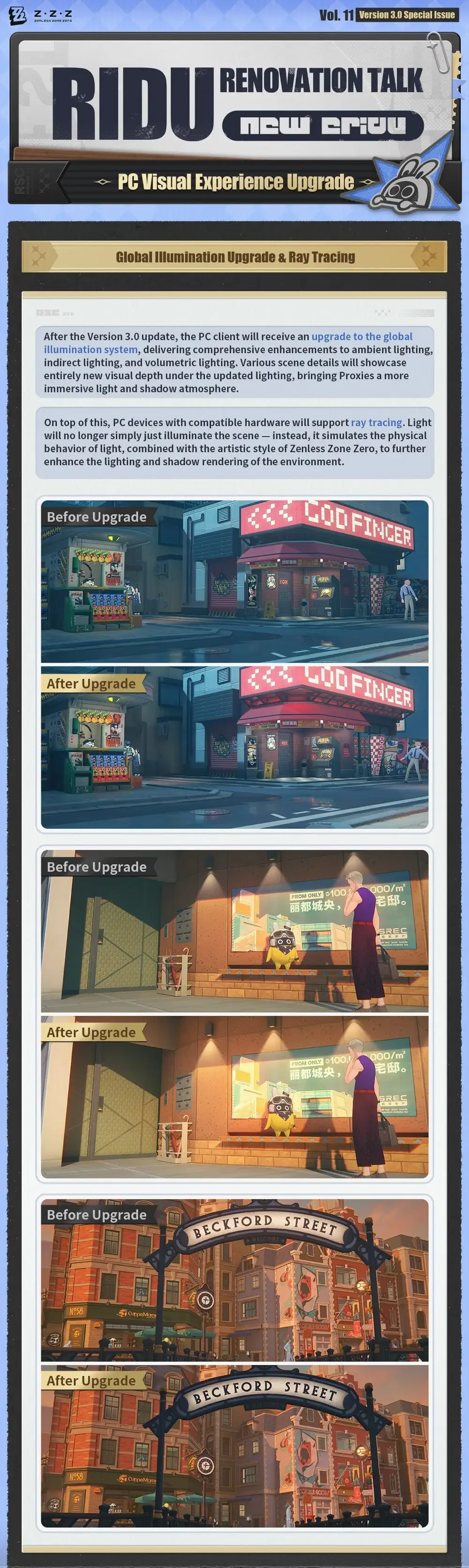
The biggest graphical improvement in Version 3.0 is the upgraded Global Illumination system. According to the official developer notes, the PC client now features comprehensive improvements to ambient, indirect, and volumetric lighting.
Instead of relying primarily on direct light sources, the upgraded system allows light to spread more naturally throughout environments. As a result, indoor and outdoor locations gain additional depth, making buildings, streets, and interiors appear more realistic.
The enhanced lighting system delivers several noticeable improvements:
Better Ambient Lighting
Ambient lighting now fills scenes more naturally. Dark areas retain more visible detail while maintaining realistic contrast, helping environments feel less flat.
Players exploring New Eridu's neighborhoods will notice softer lighting transitions between illuminated and shaded areas.
Improved Indirect Lighting
Indirect lighting now reacts more realistically to surrounding surfaces. Instead of appearing uniformly bright or dark, walls, storefronts, and streets receive reflected light, creating a more believable atmosphere.
This subtle enhancement increases scene depth without dramatically changing the game's colorful visual identity.
Enhanced Volumetric Lighting
Volumetric lighting adds greater realism to environmental effects. Light passing through spaces now appears more dynamic, creating stronger visual separation between foreground and background objects.
The result is an environment that feels richer while remaining faithful to Zenless Zone Zero's anime-inspired presentation.
Ray Tracing Delivers More Realistic Light and Shadows
Compatible PC hardware now supports real-time ray tracing in Version 3.0. Rather than simply brightening a scene, ray tracing simulates the physical behavior of light as it reflects, scatters, and interacts with surrounding surfaces.
This technology allows lighting and shadows to behave more naturally throughout New Eridu.
According to the official preview, ray tracing enhances:
Environmental lighting
Shadow rendering
Surface reflections
Overall scene realism
Artistic lighting consistency
Unlike conventional lighting systems, ray tracing produces shadows that respond more accurately to nearby objects and light sources. This helps streets, storefronts, interiors, and city landmarks appear more immersive during exploration.
Before-and-After Comparisons Show Noticeable Improvements
The official comparison images demonstrate clear visual improvements across multiple locations. Rather than dramatically changing colors, Version 3.0 focuses on improving realism through lighting quality and environmental depth.
Several improvements are immediately noticeable in the comparison screenshots.
Storefront Lighting Appears More Vibrant
Store signs emit brighter, more realistic illumination that naturally spreads across nearby walls and sidewalks. Reflected light also increases the overall depth of nighttime city scenes.
Interior Scenes Feel Warmer
Rooms receive softer indirect lighting, making furniture, walls, and decorative objects appear more naturally illuminated without losing visual clarity.
Outdoor Environments Gain Better Depth
Street lighting creates a stronger separation between buildings, roads, and characters. This helps environments appear less flat while maintaining consistent artistic direction.
Version 3.0 Continues Zenless Zone Zero's Visual Evolution
The upgraded lighting system represents one of the most significant graphical improvements introduced for the PC client. Rather than redesigning existing environments, HoYoverse has enhanced how light behaves throughout the world, making exploration feel more immersive while preserving the game's established aesthetic.
For players who enjoy taking screenshots or simply appreciating New Eridu's environments, these lighting improvements are expected to be among the most noticeable changes in Version 3.0.
Birthday artwork, promotional illustrations, and official game visuals often inspire interest in licensed collectibles within the community. At Animon Life, official Zenless Zone Zero merchandise based on character art and promotional releases is among the product categories collectors closely follow, particularly in North America.
Model Detail Optimization Improves Scene Quality
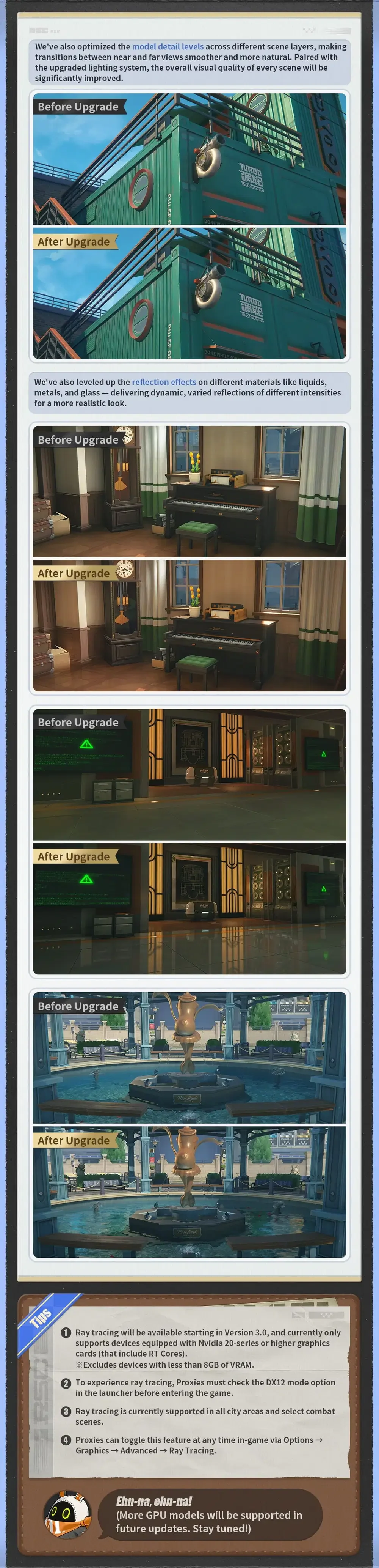
Version 3.0 enhances model detail levels to make every environment appear smoother and more natural. Alongside the lighting improvements, HoYoverse has optimized how objects are displayed across different scene layers, reducing noticeable transitions between nearby and distant models.
This enhancement creates a more seamless viewing experience while exploring New Eridu. Buildings, environmental objects, and scenery maintain a stronger visual consistency as players move through the city, making exploration feel more immersive.
Rather than introducing new assets, the optimization improves how existing models are rendered, helping environments maintain their level of detail over varying distances.
Smoother Transitions Between Near and Far Objects
Objects now blend more naturally across viewing distances. The official developer notes explain that transitions between nearby and distant scenery have been refined, reducing sudden visual changes that can occur as you move through the environment.
This improvement contributes to:
More consistent scene rendering
Reduced visual pop-in between object distances
Better environmental continuity
Improved overall image quality
When combined with the upgraded lighting system, these adjustments help create a cleaner and more polished presentation throughout New Eridu.
Reflection Effects Become More Realistic
Version 3.0 also upgrades reflection rendering across multiple material types. The update introduces more dynamic reflections on liquids, metal surfaces, and glass, allowing environments to respond more naturally to surrounding light sources.
Rather than displaying static reflections, surfaces now show varied reflection intensity depending on lighting conditions and material properties.
According to the official preview, the upgraded reflection system supports:
Water surfaces
Glass windows
Metallic objects
Indoor reflective flooring
Outdoor environmental materials
These enhancements make both indoor and outdoor locations appear more lifelike without altering the game's stylized art direction.
Improved Indoor Lighting and Reflections
Interior environments benefit noticeably from the reflection upgrade. Official comparison images show brighter lighting around furniture, polished floors, and decorative objects.
Shiny surfaces now capture surrounding light more accurately, adding depth and making rooms feel more naturally illuminated.
Outdoor Water and Metal Surfaces Show Greater Detail
Outdoor scenes also receive richer reflections. Water fountains, wet streets, storefront windows, and metallic structures exhibit improved reflectivity, enhancing the realism of city environments.
Combined with the new Global Illumination system, reflections help reinforce the atmosphere of New Eridu without overwhelming its anime-inspired visuals.
Super Resolution Helps Maintain High Frame Rates
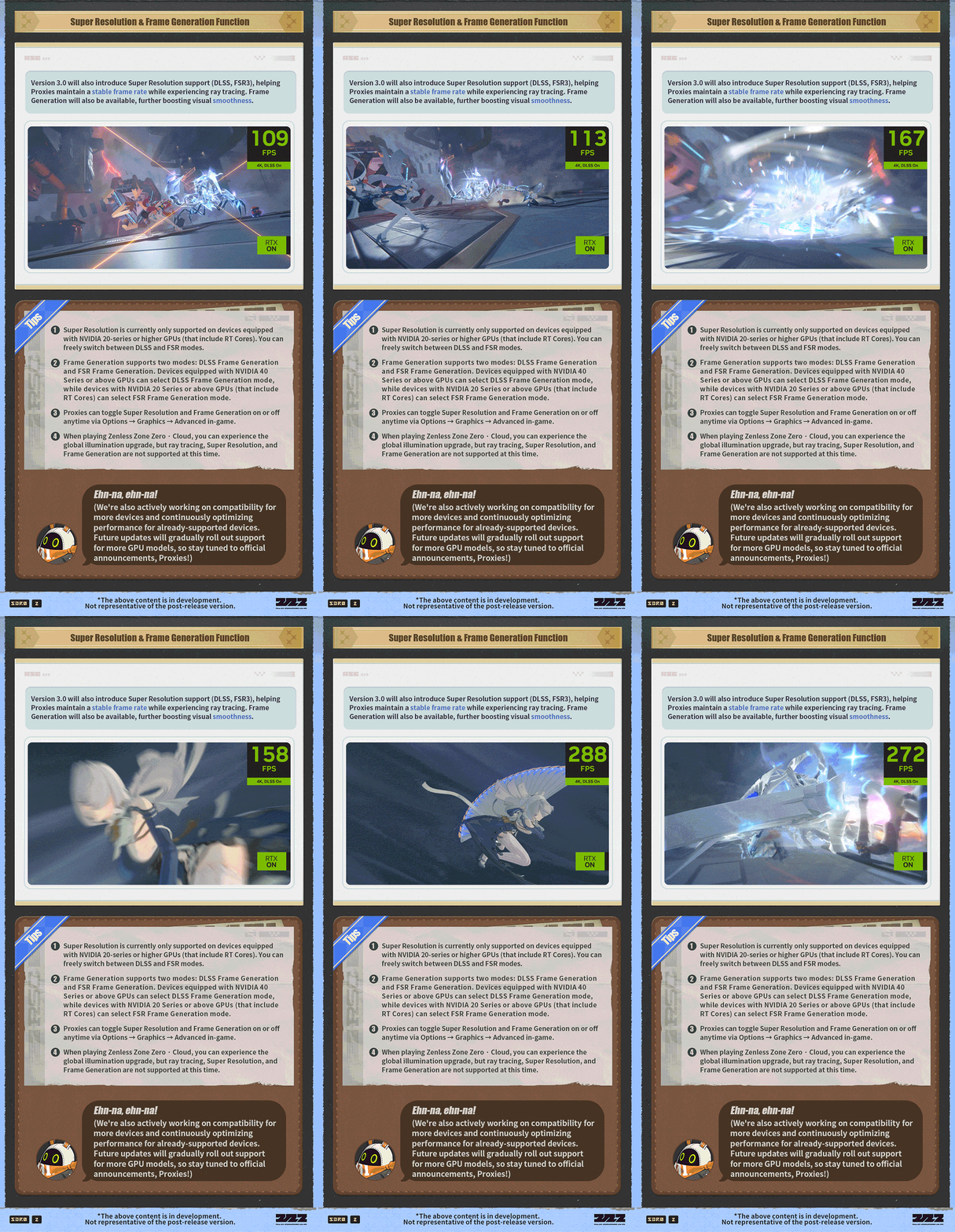
Version 3.0 introduces Super Resolution technology to improve performance while preserving image quality. The update supports both NVIDIA DLSS and AMD FSR3, allowing compatible systems to upscale rendered images while maintaining smoother frame rates.
This feature is especially valuable when using demanding graphics options such as ray tracing.
According to the official developer notes, Super Resolution helps players:
Maintain stable frame rates.
Preserve visual clarity.
Reduce performance impact from advanced lighting.
Enjoy smoother gameplay on supported hardware.
Players can freely switch between DLSS and FSR modes through the graphics settings, depending on their GPU configuration.
Frame Generation Delivers Even Smoother Gameplay
Frame Generation is another major addition arriving with Version 3.0. This technology creates additional frames between rendered images, increasing perceived smoothness during gameplay.
The official announcement confirms support for two Frame Generation technologies:
DLSS Frame Generation
FSR Frame Generation
These technologies are designed to complement Super Resolution, delivering improved responsiveness and smoother animation in visually demanding scenes.
GPU Compatibility Differs Between Technologies
Frame Generation availability depends on your graphics hardware.
DLSS Frame Generation is available for systems equipped with NVIDIA GeForce RTX 40 Series GPUs or newer.
FSR Frame Generation supports a wider range of compatible NVIDIA hardware beginning with RTX 20 Series GPUs equipped with RT Cores.
HoYoverse also notes that support for additional GPU models is planned for future updates.
Graphics Technologies Introduced in Version 3.0
| Technology | Official Function | Compatibility |
|---|---|---|
| Global Illumination | Enhances ambient, indirect, and volumetric lighting for more realistic environments. | PC Client |
| Ray Tracing | Simulates realistic lighting and shadow behavior to improve environmental depth and immersion. | NVIDIA GeForce RTX 20 Series or newer with RT Cores and at least 8 GB VRAM. |
| Super Resolution | Improves image quality while helping maintain stable frame rates using AI-assisted upscaling technologies. | Compatible GPUs supporting NVIDIA DLSS or AMD FSR3. |
| DLSS Frame Generation | Generates additional frames to deliver smoother gameplay and higher perceived frame rates. | NVIDIA GeForce RTX 40 Series GPUs. |
| FSR Frame Generation | Boosts gameplay smoothness through AMD Frame Generation technology. | NVIDIA GeForce RTX 20 Series or newer with RT Cores. |
| Reflection Upgrade | Enhances reflections on water, glass, metal, and other reflective surfaces for improved realism. | PC Client |
These technologies work together to balance visual fidelity and performance, giving players more flexibility to customize their graphics settings based on their hardware.
For players who enjoy collecting official Zenless Zone Zero artwork and promotional releases alongside game updates, communities often follow announcements beyond gameplay improvements. Retailers such as Animon Life frequently track official franchise releases and collectibles that accompany major version updates, making it easier for fans to stay informed about licensed merchandise.
Hardware Requirements Determine Which Features You Can Use
The new visual technologies in Version 3.0 require compatible PC hardware to deliver the best experience. While the Global Illumination upgrade benefits the PC client overall, advanced features such as Ray Tracing and Frame Generation are only available on supported graphics cards.
According to the official developer notes, players who want to enable Ray Tracing should ensure their systems meet the recommended hardware specifications before activating the feature.
Minimum Requirements for Ray Tracing
Ray Tracing is available only on compatible NVIDIA graphics cards with sufficient video memory. HoYoverse specifies that the feature requires:
NVIDIA GeForce RTX 20 Series or newer graphics cards with RT Cores
At least 8 GB of VRAM
DirectX 12 (DX12) enabled
The latest PC client has been updated to Version 3.0
Players with compatible hardware can enjoy improved lighting, more realistic shadows, and enhanced environmental reflections throughout supported areas.
Enabling the New Graphics Features Is Straightforward
Version 3.0 places all major graphics options within the Advanced Graphics menu. Players can customize their visual settings based on both hardware capability and performance preferences.
To enable Ray Tracing, navigate to:
Options → Graphics → Advanced → Ray Tracing
Similarly, Super Resolution technologies such as DLSS and FSR3 can be activated through:
Options → Graphics → Advanced
These settings allow players to balance image quality and frame rate depending on their PC configuration.
Choose Settings That Match Your Hardware
Not every system needs to enable every graphics option. Players using higher-end GPUs can maximize image quality with Ray Tracing and Frame Generation, while those with mid-range hardware may prefer Super Resolution technologies to maintain smoother performance.
This flexibility allows Version 3.0 to accommodate a wide range of gaming PCs without sacrificing visual quality.
Zenless Zone Zero Cloud Has Different Graphics Support
The cloud version of Zenless Zone Zero does not currently support every new PC graphics technology. While players using the cloud service can experience the upgraded Global Illumination system, several advanced rendering features remain unavailable.
According to the official announcement:
✅ Global Illumination is supported.
❌ Ray Tracing is not currently supported.
❌ Super Resolution is unavailable.
❌ Frame Generation is unavailable.
These limitations primarily affect cloud gaming users, while players using the native PC client with compatible hardware can access the full range of Version 3.0 visual upgrades.
HoYoverse Plans to Expand Compatibility
Additional hardware support is planned for future updates. The developer notes confirm that compatibility for more GPU models will continue to improve beyond Version 3.0.
This approach allows HoYoverse to introduce advanced rendering technologies while gradually expanding accessibility as optimization work continues. Players whose hardware is not currently supported may receive compatibility in future releases.
What Version 3.0 Means for PC Players
Version 3.0 represents one of the most significant graphical upgrades to Zenless Zone Zero since its release. Instead of focusing solely on higher-resolution textures or isolated visual effects, the update improves multiple aspects of the rendering pipeline, including lighting, reflections, model rendering, and frame generation.
For players, this means:
More immersive city environments
Better lighting throughout exploration and selected combat scenes
Improved reflections on various materials
Smoother gameplay with DLSS and FSR technologies
Greater flexibility to customize graphics settings based on hardware
Together, these enhancements create a richer visual experience while preserving the game's distinctive anime-inspired art style.
Summary
Ridu Renovation Talk Vol. 11 highlights how Version 3.0 transforms the PC version of Zenless Zone Zero through comprehensive visual improvements. The update introduces an upgraded Global Illumination system, Ray Tracing support for compatible hardware, refined model rendering, enhanced reflections, Super Resolution technologies, and Frame Generation.
Rather than changing the game's artistic identity, these improvements enhance realism, environmental depth, and overall performance. Players with compatible PCs can enjoy a more immersive New Eridu, while HoYoverse has also confirmed that additional hardware compatibility is planned for future updates.
As major game updates often generate interest in official artwork, collectibles, and licensed products alongside technical improvements, communities also follow related franchise releases. Animon Life continues to follow and update official merchandise releases like this for North American customers.
Frequently Asked Questions
Does Zenless Zone Zero Version 3.0 add Ray Tracing?
Yes. Version 3.0 introduces Ray Tracing support for the PC client. The feature is available on compatible NVIDIA GeForce RTX 20 Series or newer graphics cards with RT Cores and at least 8 GB of VRAM.
Which Super Resolution technologies are supported?
Version 3.0 supports both NVIDIA DLSS and AMD FSR3, allowing compatible systems to improve image quality while maintaining smoother frame rates.
Does Zenless Zone Zero Cloud support all Version 3.0 graphics features?
No. The cloud version currently supports Global Illumination, but Ray Tracing, Super Resolution, and Frame Generation are not available.
Where can I enable the new graphics settings?
Players can access the new options by opening Options → Graphics → Advanced, where features such as Ray Tracing, DLSS, and FSR3 can be enabled on supported hardware.